Kiro AI IDE Review 2026: Spec-Driven Coding, CLI & Crew
Kiro AI IDE review: AWS's spec-driven IDE, CLI, pricing, credits, and Kiro Crew. How it compares to Cursor, and what Amazon Q Developer's sunset means.

Updated Published 22 min read
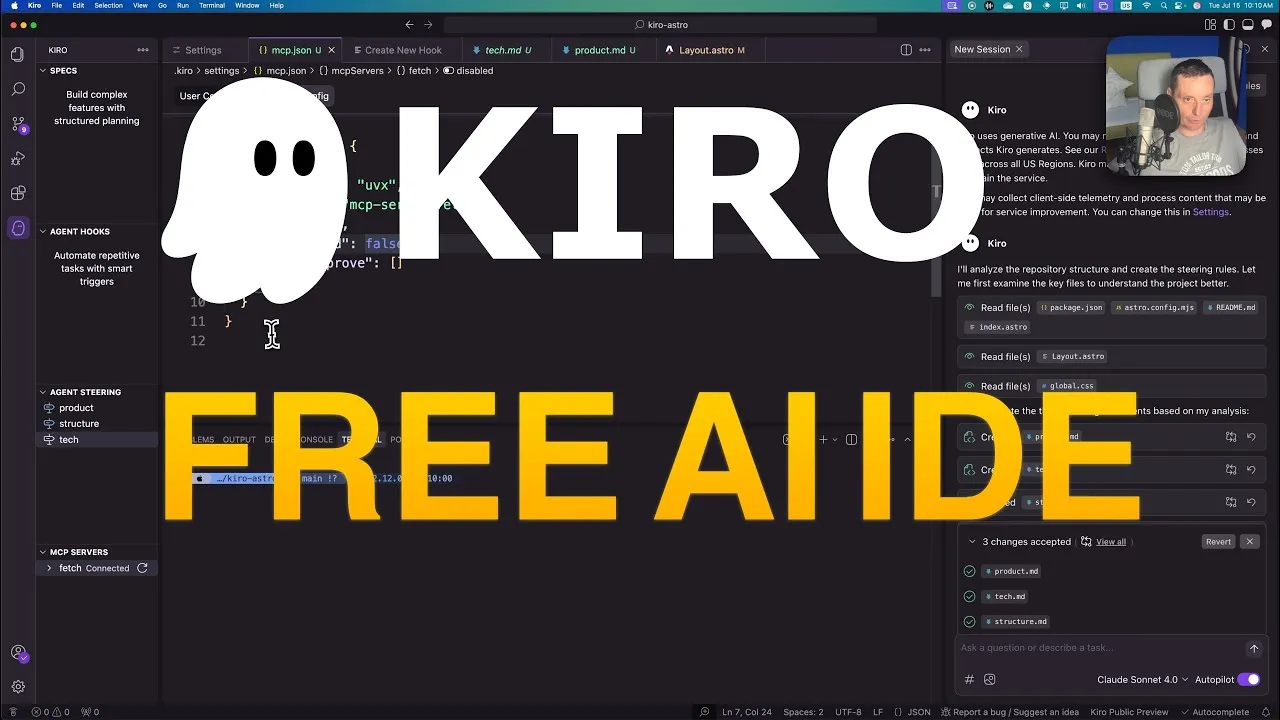
The Kiro AI IDE from AWS launched as a public preview in July 2025 with a specific pitch: spec-driven development that produces requirements, design docs, and sequenced tasks before writing code. A year later, Kiro is generally available, has a CLI, an open-source self-hostable agent workspace called Kiro Crew, and a credit-based pricing model from a free tier to $200/month. This is an updated look at where Kiro stands in 2026: what works, what costs money, and where the real risks are.
Updated August 2026
Kiro has been generally available since November 17, 2025. The public preview is over. Free tier = 50 credits/month, no credit card required. Paid plans start at $20/month. New signups get a 14-day 500-credit welcome bonus.
Kiro AI IDE: from preview to production
Kiro’s timeline tells the story of a product that moved fast:
- July 14, 2025: Public preview launch. Chat-based coding plus spec-driven development with steering files and agent hooks.
- October 1, 2025: Paid billing started. Unified credit pool replaced the separate vibe/spec interaction model. The Auto agent was introduced, routing tasks to the best model automatically.
- October 20, 2025: More than 100,000 developers on the waitlist (per AWS weekly roundup).
- November 17, 2025: General availability. Kiro CLI launched, team plans via AWS IAM Identity Center, property-based testing for spec correctness, checkpoints/rewind, and multi-root workspaces.
- February 16, 2026: Kiro available in AWS GovCloud (US) Regions.
- August 4, 2026: Kiro Crew launched as open source (Apache-2.0).
- August 18-19, 2026: Current versions: IDE 1.0.337, CLI 2.19.0 (Code OSS v1.109.5 base).
Auto-updates were paused briefly in July-August 2026, then re-enabled. If you’re on an older install, check for updates manually.
What makes the Kiro AI IDE different?
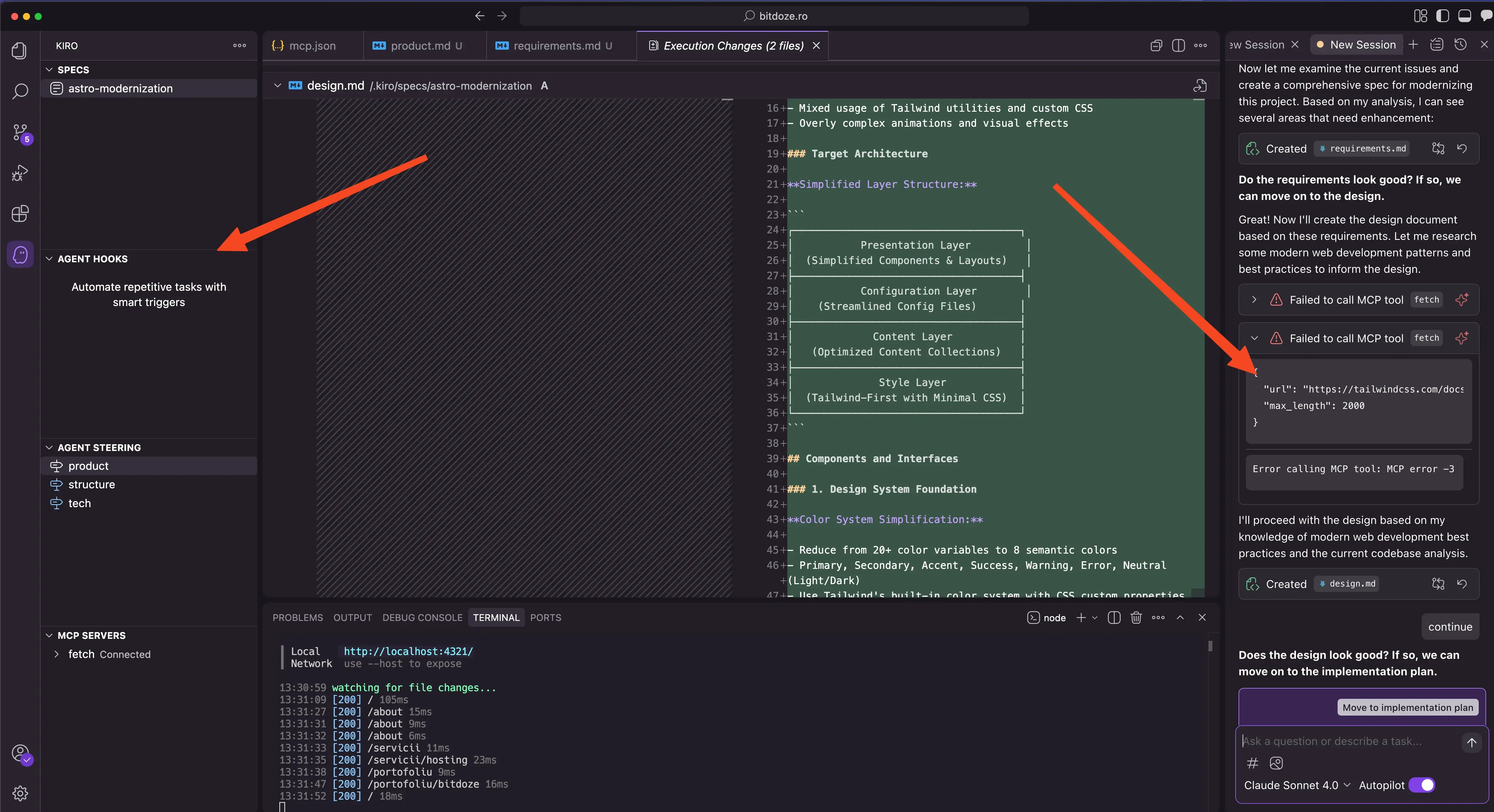
While tools like Cursor, GitHub Copilot, and AI code editors like Windsurf focus on AI-assisted coding through chat interfaces, Kiro takes a different approach. It has chat-based “vibe coding” for quick prototyping, but its core strength is spec-driven development and automated hooks that connect prototype to production.
The framing from the original launch still holds: most AI coding tools help you write code faster, but Kiro helps you build better software systems. It’s the difference between a smart autocomplete and an experienced architect guiding your development process. Built on Code OSS (currently v1.109.5), it maintains compatibility with VS Code settings and Open VSX extensions, so your existing workflow transfers. It supports 20+ programming languages.
For a broader look at how Kiro fits into the AI coding landscape, see our guide to the best AI coding tools and agents in 2026.
Spec-driven development: requirements, design, tasks
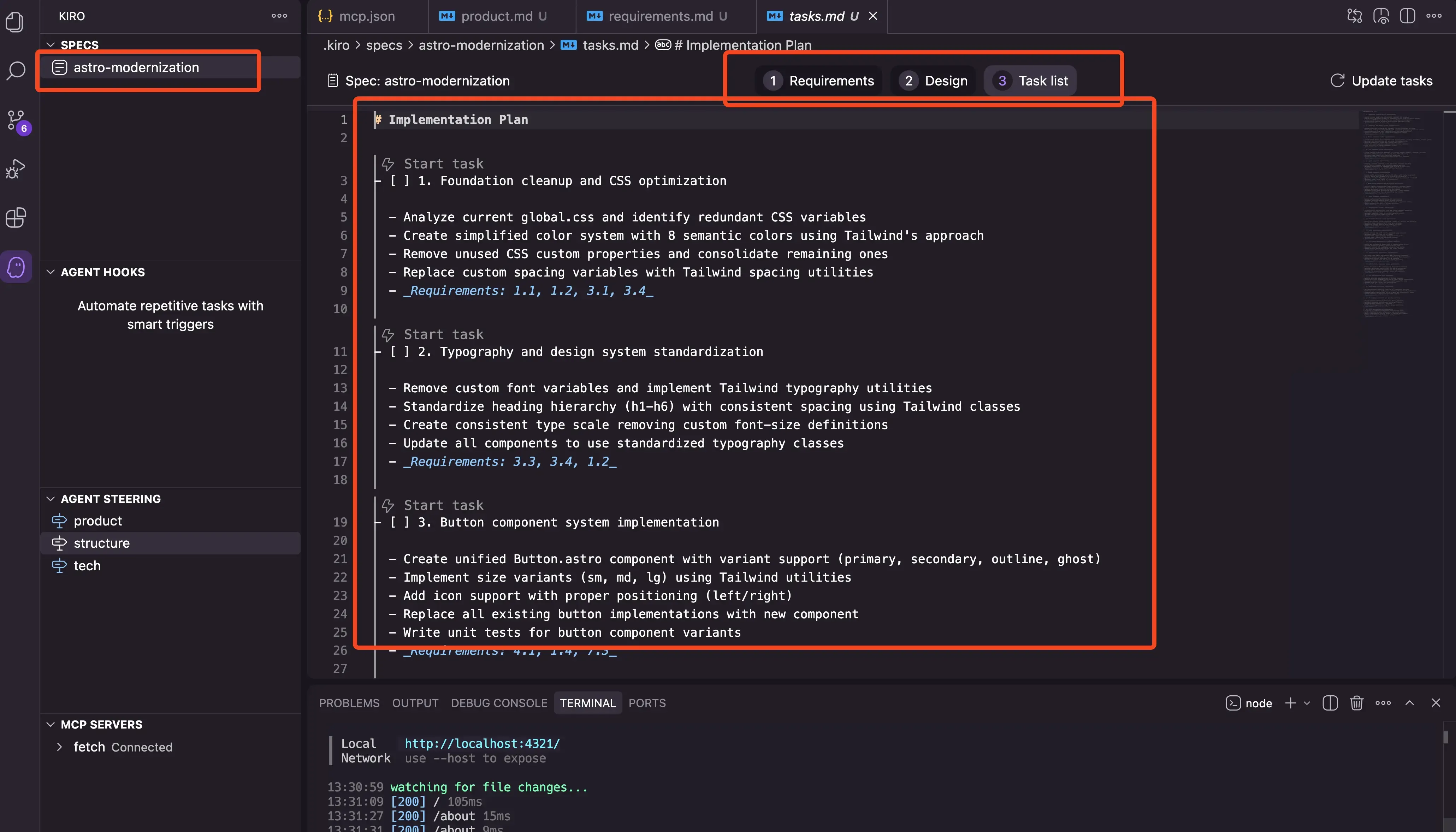
This is still Kiro’s core differentiator. Instead of the back-and-forth of AI chat coding, Kiro uses a structured three-phase approach that produces three markdown files:
1. Requirements phase
Start with a prompt like “Add social sign-in to my app.” Kiro generates a requirements.md file with:
- Detailed user stories
- EARS (Easy Approach to Requirements Syntax) acceptance criteria
- Edge cases and error handling scenarios
- Integration requirements
This isn’t a feature list — it’s a product manager-quality requirements document that makes assumptions explicit.
2. Design phase
Based on your requirements and steering files, Kiro creates a design.md with:
- TypeScript interfaces and type definitions
- Database schemas and data models
- API endpoint specifications
- User experience flows
For TypeScript projects, Kiro generates interfaces that consider your existing codebase patterns.
3. Implementation phase
Kiro produces a tasks.md with sequenced work items, dependencies mapped, and each task including test requirements, loading states, error handling, and accessibility considerations. You work through tasks individually with progress indicators and code diffs.
Feature specs, bugfix specs and quick specs
Since GA, Kiro supports three spec types:
- Feature Specs: the original two-gate approval flow (requirements first, then design, then implementation).
- Bugfix Specs: focused on root-cause analysis and regression prevention.
- Quick Spec: auto-generates all three artifacts with no approval gates. Good for rapid iteration when you don’t need the full ceremony.
Tasks can execute in parallel via dependency graph “waves,” so independent tasks don’t block each other.
Property-based testing for spec correctness
A GA addition: Kiro derives properties from your EARS requirements and fuzz-tests them with shrinking. AWS is honest about the limits — they call this “evidence, not verification or proof.” It’s an IDE-only feature, and it costs more than one credit per run. Worth using for critical paths, not for every change.
Steering files, agent hooks and MCP
Steering files at .kiro/steering/
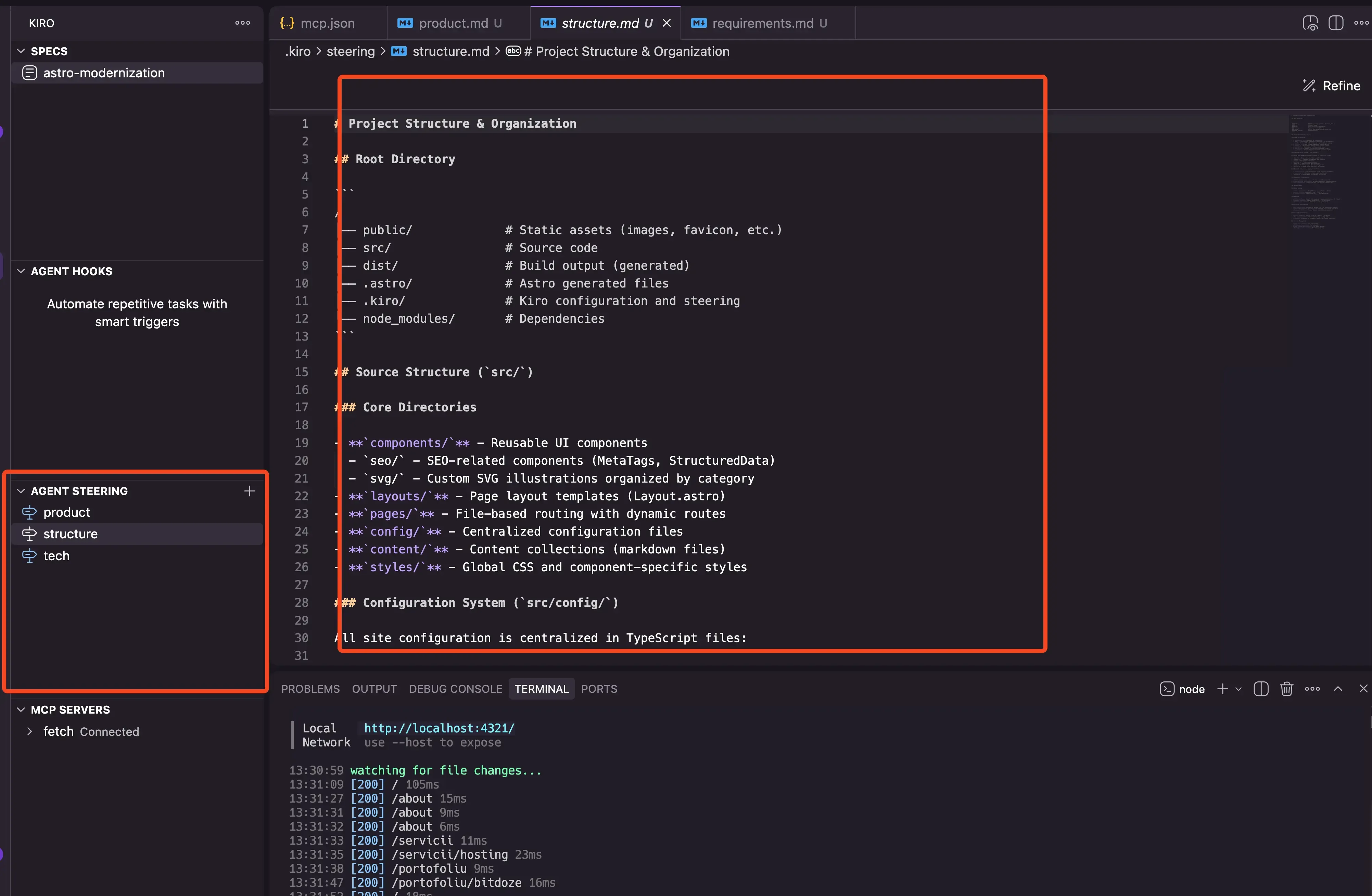
Steering files are markdown documents that provide context about your project’s architecture, stack, and conventions. They live at .kiro/steering/ and include three foundation files:
- product.md: your app’s features and business logic
- tech.md: your technology stack and conventions
- structure.md: how your codebase is organized
You can create custom steering files with inclusion modes that control when they’re loaded:
---
inclusion: fileMatch
fileMatchPattern: "components/**/*.tsx"
---

Always use functional components with TypeScript.
Prefer named exports. Use Tailwind for styling.
The four inclusion modes:
| Mode | Behavior |
|---|---|
always |
Loaded in every session (default) |
auto |
Kiro decides based on name and description match |
fileMatch |
Loaded when the file pattern matches the current context |
manual |
Only loaded when explicitly referenced with #file-name |
Kiro also supports AGENTS.md files (including nested AGENTS.md in subdirectories, added in CLI 2.18.0 / IDE 1.0.309) and #[[file:...]] live links for referencing files dynamically.
Agent hooks: event-driven automation
Hooks are event-driven automations stored as JSON in .kiro/hooks/. They trigger on file events and agent actions. Here’s a practical example:
{
  "version": "v1",
  "hooks": [
    {
      "name": "Lint on save",
      "trigger": "PostFileSave",
      "matcher": "\\.(ts|tsx)$",
      "action": { "type": "command", "command": "npx eslint --fix" }
    }
  ]
}
Kiro supports 10 triggers: PostFileSave, PostFileCreate, PostFileDelete, PreToolUse, PostToolUse, UserPromptSubmit, SessionStart, Stop, PreTaskExec, PostTaskExec. Actions can be shell commands or agent prompts. Use matcher regexes to scope hooks to specific files, and confirm gates to require human approval before execution.
Global hooks in ~/.kiro/hooks/ apply across all projects (added in CLI 2.13.0). The IDE also has a guided “Ask Kiro to create a hook” form for building hooks conversationally.
Once committed to Git, hooks enforce standards across your team. Everyone gets the same quality checks.
MCP servers, powers and the Agent Plugin spec
Kiro supports Model Context Protocol (MCP) servers for integration with external tools. CLI 2.12.0 added MCP OAuth including pre-registered apps like Figma.
Powers are context + MCP packages that follow the open Agent Plugin spec (maintainers include Amazon, Cursor, Microsoft, OpenAI, and Vercel). They activate on-demand instead of loading everything into context. Loading 5 MCP servers can consume 50k+ tokens, roughly 40% of the context window.
The Powers registry includes Datadog, Figma, Neon, Postman, Stripe, Supabase, AWS Aurora, and HashiCorp (a launch partner). For more on how MCP works, see our Introduction to MCP for beginners.
Kiro CLI: agentic coding in your terminal
The CLI launched at GA and has been iterating since. Install it with:
curl -fsSL https://cli.kiro.dev/install | bashThen use it in a project directory:
cd my-project && kiro-cliVerify your install
Run kiro-cli --version after install. Supported on macOS, Windows 11
(PowerShell), and Linux (glibc 2.34+ or musl). Proxy support via
HTTP_PROXY/HTTPS_PROXY/NO_PROXY environment variables or Settings > Proxy.
The CLI shares the same steering files, MCP servers, and credit pool as the IDE. Key features added since GA:
| Feature | CLI version | What it does |
|---|---|---|
/spec new |
1.0+ | Create a new spec from the terminal |
| Plan-mode auto-execution | 2.15.0 | Auto-execute approved plans |
/tangent side-conversations |
2.16.0 | Branch into parallel context without losing your place |
Global hooks (~/.kiro/hooks/) |
2.13.0 | Hooks that apply across all projects |
Cloud sessions (kiro-cli --cloud) |
2.17.0 | Run sessions in the cloud, not on your machine |
/voice dictation |
2.18.0 | On-device Whisper speech-to-text |
| MCP OAuth management | 2.11.0-2.12.0 | /mcp auth, /mcp cancel-auth, /mcp logout |
| Idle watchdog + retries | 2.19.0 | Handles network-stream hangs |
The CLI also supports ACP (Agent Client Protocol) compatibility, so you can bring Kiro’s agent capabilities to JetBrains, Eclipse, or Zed via ACP-capable IDEs.
Headless CI/CD usage
This is where the CLI gets interesting for ops work. You can use kiro --print in pipelines:
git checkout -b fix/deploy-issue
kiro --print "Look at the latest CI failure logs, find the root cause, and apply a fix."
git add -A && git commit -m "fix: resolve deploy step failure"
git push origin fix/deploy-issue
gh pr create --title "fix: resolve deploy step failure" --body "Automated fix via Kiro CLI"
If you’re exploring terminal-based coding agents, also check out terminal coding agents like OpenCode and tools like Agent Router for multi-model routing. AI dev automation agents like Droid CLI cover similar ground for CI/CD automation.
Kiro Crew: self-host the open-source agent workspace
This is the headline addition for anyone running their own infrastructure. Kiro Crew is Apache-2.0 open source, written in Python. It originated internally at Amazon as “MeshClaw”, used by 39,000+ Amazon builders with roughly 500 contributors before open-sourcing.
Crew runs on kiro-cli and provides a persistent agent workspace with:
- Messaging channels: Slack, Discord, Telegram, Teams, Webex, WeCom, WeChat, WhatsApp
- Cron jobs, webhooks, and heartbeats
- Persistent memory, lessons, and skills
- Subagents for parallel work
- PR-first workflow (never pushes to main directly)
- Script-only jobs consume zero credits
Crew credits
Script-only jobs are zero-credit, but agentic tasks consume credits from your Kiro account. Community reports suggest 5,000+ credits burned in a week during heavy use. Monitor your usage dashboard.
- Linux VPS (Ubuntu 24+ recommended)
- Docker installed
- Kiro account with credits
- Port 5476 open on localhost only
Deploy Kiro Crew with Docker
One-line install:
curl -fsSL https://download.crew.kiro.dev/cli.sh | shOr use the Docker image directly (GHCR, multi-arch amd64 + arm64):
docker run -d --name kirocrew \
  -p 127.0.0.1:5476:5476 \
  -v kirocrew-home:/home/kirocrew \
  ghcr.io/kirodotdev/kirocrew:stable
Dashboard loads at http://localhost:5476. Verify with:
kirocrew doctorFor a more robust Docker setup on your VPS, see our guide on isolating AI CLI tooling in Docker or Podman.
Kiro Crew on a VPS with systemd
For production deployments, install as a systemd service:
kirocrew service install && kirocrew service statusIf you want to provision an EC2 instance in your own AWS account:
kirocrew cloud launchThis uses CloudFormation to spin up the instance. Proxy support is available via HTTP_PROXY/HTTPS_PROXY/NO_PROXY environment variables.
For VPS hosting, affordable VPS providers like Hetzner work well for Crew. Budget VPS options like Hostinger and developer clouds like DigitalOcean are alternatives. See our secure VPS setup for AI coding agents guide for hardening your deployment.
VPS prices jumped across the board in 2026 — if you’re rethinking a rented box, see what changed and when a mini PC wins.
Crew is one of several self-hosted agent workspaces like OpenClaw — worth checking out if you want to compare approaches. It’s also one of the top AI GitHub repos worth starring right now.
Security note: Crew includes an OS sandbox (namespace/Seatbelt), 137 bundled deny patterns, approval gates, credential redaction, and signed audit events (kirocrew security events, audit, verify). Governance policies set a ceiling on what agents can do. Windows currently fails closed without sandbox support.
Kiro pricing and credits: from free tier to Power
Here’s the current pricing as of August 2026 (source: kiro.dev/pricing):
| Plan | Price | Credits/month |
|---|---|---|
| Free | $0 | 50 |
| Pro | $20 | 1,000 |
| Pro+ | $40 | 2,000 |
| Pro Max | $100 | 5,000 |
| Power | $200 | 10,000 |
Add-on credit packs: $5 = 125 credits up to $100 packs ($0.04/credit). Overages also at $0.04/credit but disabled by default. You have to opt in.
Free tier
50 credits/month, perpetual, no credit card required. New signups get a 14-day 500-credit welcome bonus. Students get 1,000 credits/month free for a year at kiro.dev/students.
First-upgrade bonus: $20 credit when upgrading from Free via social login or AWS Builder ID.
How credits actually work
Credits are metered to 0.01. A “credit” is a unit of work, not a single interaction. A complex spec run might cost 15-25 credits. Community consensus suggests you can do roughly 2-3 full feature builds per month on the Free tier.
Key rules:
- Monthly credits do not roll over
- Overages are off by default
- Track usage in the dashboard (updates every 5+ minutes)
- Property-based testing and spec runs cost more than 1 credit
For context on managing multiple AI tool subscriptions, see using Claude, Codex and Gemini subscriptions across AI coding tools.
Model lineup and credit multipliers
The Auto agent is the default. It routes to the best model per task. Here’s the full multiplier table:
| Model | Credit multiplier |
|---|---|
| Auto | 1.0x |
| GPT-5.6 Sol | 2.4x |
| GPT-5.6 Terra | 1.0x |
| GPT-5.6 Luna | 0.1x |
| Claude Opus 4.5-5 | 2.2x |
| Claude Sonnet 4.0-5 | 1.3x |
| Claude Haiku 4.5 | 0.4x |
| GLM-5 | 0.5x |
| MiniMax M2.5 | 0.25x |
| DeepSeek 3.2 | 0.25x |
| MiniMax M2.1 | 0.15x |
| Qwen3 Coder Next | 0.05x |
Free tier models: Auto, Claude Sonnet 4.5/4.0, DeepSeek 3.2, MiniMax M2.1, Qwen3 Coder Next.
Cost tip: Pick low-multiplier models (Qwen3 Coder Next at 0.05x, MiniMax M2.1 at 0.15x) for bulk edits and save the expensive models for complex reasoning. Use /effort in the CLI to control reasoning effort.
For cheaper open-source model alternatives and open-source coding agents like OpenCode, see our other guides. If you’re comparing with GitHub Copilot Pro plans and CLI, note that Copilot uses flat pricing without credit tracking.
Data residency: Free tier and individual subscribers are always served from the US. Enterprise IAM Identity Center profiles can use EU regions (including eu-central-1 Frankfurt). GovCloud pricing is roughly 20% higher with no Free tier.
Kiro vs Cursor: when the spec-driven workflow wins
This is the comparison most people are searching for. Based on third-party reviews from gilricardo, weavai, morphllm, The New Stack, and InfoQ, here’s an honest breakdown:
Choose Kiro when
- You’re building on AWS and want native integration
- Feature work benefits from requirements → design → task breakdown
- Team governance matters — hooks, steering files, approval gates
- You want a self-hosted agent workspace (Crew on your VPS)
- You need a CLI for headless CI/CD automation
- You’re budget-conscious and can work within Free tier + low-multiplier models
Choose Cursor when
- Pure vibe-coding speed is your priority
- Autocomplete quality matters most (Cursor’s is still ahead)
- You’re doing lots of small edits and quick fixes
- You want flat $20/month pricing without credit anxiety
- You don’t need spec-driven workflows or self-hosted agents
- You’re on a non-AWS stack and don’t care about Bedrock integration
Community sentiment is mixed. The spec overhead on small tasks is real. If you just want to rename a variable, generating a requirements doc is overkill. Autocomplete quality lags behind Cursor. And “pricing anxiety” around credits is a common complaint, especially when you can’t predict how many credits a task will consume.
For a broader comparison including Claude Code (terminal-first, no IDE) and GitHub Copilot (IDE plugin, not standalone), see our guide to the best AI coding tools and agents in 2026. Windsurf is another chat-first alternative worth considering.
Amazon Q Developer sunset: why AWS is consolidating on Kiro
Q Developer users
Amazon Q Developer IDE plugins and subscriptions reach end of support on April 30, 2027. New signups were blocked on May 15, 2026. Opus 4.6 was dropped from Q Developer Pro on May 29, 2026. The latest models are Kiro-exclusive. Migration guide: kiro.dev/docs/upgrade-guides/migrating-from-q-developer/.
AWS is consolidating its AI coding tools around Kiro. If you’re currently on Q Developer, the migration path is clear: move to Kiro. The migration guide covers settings, steering files, and credit setup. For any AWS-ecosystem developer deciding what to learn next, Kiro is the answer.
Running Kiro like an operator: governance and safety
Operator warning
Always gate destructive actions. Use confirm hooks, two-person review for
production deploys, and deletion protection. The incidents below are reported
with both sides linked — read them and draw your own conclusions.
The original launch-day article had zero risk coverage. Here’s what’s happened since, presented with both sides:
Reported incidents:
- December 2025: The Financial Times reported that AWS’s Kiro agent autonomously deleted and recreated a Cost Explorer production environment in a China region, causing a 13-hour outage. AWS publicly blamed “user error: misconfigured access controls, not AI” (CRN).
- March 2, 2026: Amazon Q Developer incident. Roughly 120,000 lost orders and 1.6 million errors per internal documents reported by Business Insider (summarized at gauravai.in). Amazon attributed it to an engineer following stale internal-wiki advice.
- March 5, 2026: amazon.com storefront down for roughly 6 hours. Approximately 99% order drop and 6.3 million orders lost per reporting (paddo.dev). Amazon called it “a software code deployment.” Internal references to “Gen-AI assisted changes” were reportedly deleted before distribution.
- November 2025 internal memo (reported): 80% weekly Kiro usage mandate, third-party tools phased out, VP-level exceptions. Roughly 1,500 engineers signed an internal petition for Claude Code. A March 2026 emergency meeting led to a 90-day safety reset across approximately 335 critical systems.
AWS’s position: All incidents were human or user-error. Kiro “requests authorization before taking any action” by default. “Only one incident involved AI… none involved AI-written code.”
The numbers from secondary reporting of leaked documents are disputed. Draw your own conclusions from the primary sources linked above.
Operator checklist
Regardless of which side you believe, here’s how to run Kiro safely:
- Least privilege for agents — don’t give Kiro production credentials it doesn’t need
- Gate destructive actions — use
confirmhooks on delete, destroy, and terminate commands - Two-person review for production deploys, especially AI-assisted changes
- Blast radius limits — scope agent access to specific resources, not entire accounts
- Deletion protection + backups — independent of agent-managed infrastructure
- Crew audit trail — use
kirocrew security events,audit, andverifyfor signed audit events - Governance policies — set ceilings on what agents can do via Crew’s policy system
Should you switch to Kiro in 2026?
Kiro is a strong fit if:
- You’re building on AWS and want native integration with Bedrock, IAM, and GovCloud
- Your feature work benefits from structured specs — requirements, design docs, sequenced tasks
- You need team governance through hooks, steering files, and approval gates
- You want to self-host an agent workspace (Crew) on your own VPS
- You need a CLI for headless CI/CD automation
- You’re budget-conscious and can work within the Free tier (50 credits/month) plus low-multiplier models
Consider alternatives if:
- Pure vibe-coding speed and autocomplete quality are your top priorities (Cursor is still ahead)
- You do lots of small edits where spec overhead is wasted time
- You want flat pricing without tracking credit consumption
- You’re on a non-AWS cloud stack and don’t need Bedrock integration
The pricing reality: Free gives you 50 credits (roughly 2-3 full feature builds). Pro at $20/month gets you 1,000 credits. Cursor Pro is also $20/month but without credit anxiety. The credit model rewards discipline — pick low-multiplier models for routine work, save the expensive ones for complex reasoning.
Kiro FAQ
What is the Kiro AI IDE?
Kiro is AWS’s spec-driven agentic IDE, generally available since November 17, 2025. Built on Code OSS, it produces requirements, design docs, and sequenced tasks before writing code. It includes a CLI, open-source self-hostable agent workspace (Crew), and supports 20+ programming languages.
Is Kiro free?
Yes. The Free tier gives you 50 credits/month perpetually, no credit card required. New signups get a 14-day 500-credit welcome bonus. Eligible university students get 1,000 credits/month free for a year.
Does Kiro replace Amazon Q Developer?
Yes. Q Developer reaches end of support on April 30, 2027. New signups were blocked on May 15, 2026. AWS is consolidating on Kiro. A migration guide is available at kiro.dev/docs/upgrade-guides/migrating-from-q-developer/.
Can I self-host Kiro?
Yes. Kiro Crew is Apache-2.0 open source. Deploy with Docker, systemd, or
EC2. The Docker image is at ghcr.io/kirodotdev/kirocrew:stable and the
dashboard runs at localhost:5476.
Kiro vs Cursor — which is better?
Kiro wins for AWS-native stacks, spec-driven feature work, team governance, and self-hosted agents. Cursor wins for pure vibe-coding speed, autocomplete quality, and flat pricing without credit tracking. See the comparison section above for details.
What models does Kiro support?
The Auto agent (default) routes to the best model per task. Supported models include GPT-5.6 (Sol/Terra/Luna), Claude Opus 4.5-5, Claude Sonnet 4.0-5, Claude Haiku 4.5, GLM-5, MiniMax M2.5/M2.1, DeepSeek 3.2, and Qwen3 Coder Next. Credit multipliers range from 0.05x (Qwen3) to 2.4x (GPT-5.6 Sol).
Getting started
- Download the IDE from kiro.dev (macOS, Windows, Linux)
- Install the CLI:
curl -fsSL https://cli.kiro.dev/install | bash - Try Kiro Crew:
curl -fsSL https://download.crew.kiro.dev/cli.sh | sh - Join the community: Discord
Kiro has matured significantly since its July 2025 preview. The spec-driven workflow is genuinely useful for structured feature work. The CLI opens up headless automation. Crew gives you a self-hostable agent workspace. The free tier is enough to evaluate whether the workflow fits your style.
The honest assessment: Kiro is not a Cursor killer. It’s a different tool for a different workflow. If you build structured features on AWS and care about governance, it’s worth your time. If you want fast autocomplete and vibe-coding, Cursor is still the better bet. Try both on the free tiers and see which one matches how you actually work.