How to Use Groq's FREE API in Your Streamlit App
Learn how to integrate Groq's free API into your Streamlit app with Llama 3.1. Step-by-step code, error handling, rate limits, and deployment tips. Updated for 2026.

Updated Published 21 min read
Groq’s LPU inference engine delivers some of the fastest text generation you can get from a cloud API, and the free tier gives you real access with no credit card. If you want to build an AI-powered Streamlit app without paying for API calls, this is the fastest path I know.
The original version of this article (March 2024) used Mistral models on Groq. That no longer works. Groq deprecated all Mistral models by July 2025. This updated guide uses Llama 3.1 8B Instant instead: same free tier, same Groq speed, and a model that’s still actively supported. The core integration pattern hasn’t changed, so most of what you learn here applies regardless of which Groq model you pick.
You can have a working AI-powered Streamlit app running in under 15 minutes.
What changed since 2024: Mistral deprecation and new models
Returning from the 2024 version?
Replace model="mixtral-8x7b-32768" with model="llama-3.1-8b-instant" in your code. Everything else, the SDK install, client setup, streaming pattern, still works the same way.
Here’s the timeline:
- Feb 2024: Groq launches with Mixtral and Mistral models available via API.
- March 2025:
mixtral-8x7b-32768is deprecated and shut down. - July 2025: The last Mistral model on Groq (
mistral-saba-24b) is deprecated. No Mistral models remain on the platform.
If you’re specifically looking for Mistral, see the Mistral alternative section below. Mistral AI runs their own API with a free tier.
Current free-tier models (July 2026)
| Model ID | Best for | Free RPM | Free TPM | Speed |
|---|---|---|---|---|
llama-3.1-8b-instant |
High-volume prototyping | 30 | 6,000 | ~560 TPS |
llama-3.3-70b-versatile |
Quality output, complex tasks | 30 | 12,000 | ~280 TPS |
openai/gpt-oss-20b |
Reasoning, coding, tool use | 30 | 8,000 | ~1,000 TPS |
meta-llama/llama-4-scout-17b-16e-instruct |
Multimodal, long context | 30 | 30,000 | ~750 TPS |
For this tutorial, I default to llama-3.1-8b-instant. It’s fast, cheap (if you ever hit the paid tier), and good enough for most prototyping work. If you need higher quality output, llama-3.3-70b-versatile is the upgrade, at the cost of lower rate limits. Check the best open-source LLMs for a broader comparison of what’s available today.
Groq also now offers a Developer Tier (pay-as-you-go, credit card required) with roughly 10x the free-tier limits and access to their Batch API. For prototyping and small apps, the free tier is plenty.
If you’re scaling up and need to compare model costs across providers, see cheapest AI models for agent workflows.
Prerequisites: what you need to get started
- Python 3.10 or newer (the Groq SDK supports 3.7+, but Streamlit requires 3.10+ since v1.30)
- A Groq API key: sign up at console.groq.com, no credit card needed
pip(Python package manager)- A terminal and a text editor
- Basic Python knowledge (functions, loops, string handling)
No credit card is required for the Groq free tier. Sign up, grab your API key, and start making calls immediately.
If you’re completely new to Python and AI development, start with getting started with AI programming first.
Setting up the Groq Python SDK
Install the Groq SDK and python-dotenv for managing your API key:
pip install groq python-dotenvCreate a .env file in your project directory:
echo 'GROQ_API_KEY=gsk_your_api_key_here' > .envReplace gsk_your_api_key_here with the key from console.groq.com/keys.
Now write a quick verification script to confirm everything works:
import os
from dotenv import load_dotenv
from groq import Groq

load_dotenv()

client = Groq(api_key=os.environ.get("GROQ_API_KEY"))

completion = client.chat.completions.create(
    model="llama-3.1-8b-instant",
    messages=[{"role": "user", "content": "Say hello in one sentence."}],
    max_tokens=50,
)

print(completion.choices[0].message.content)
Run it:
python verify.pyVerify your setup
You should see a short greeting printed to the terminal, like: “Hello! How can I assist you today?” If you see output, your API key works and the SDK is installed correctly.
Common failures and fixes:
- “AuthenticationError: Invalid API Key”: Check that
GROQ_API_KEYin your.envfile matches the key at console.groq.com/keys. No trailing spaces. - “ModuleNotFoundError: No module named ‘groq’”: Run
pip install groqagain. If using a virtual environment, make sure it’s activated. - “Python version not supported”: You need Python 3.10+. Run
python3 --versionto check.
How to use the Groq API with Python
The core pattern is straightforward: create a client, send a chat completion request, handle the streamed response.
Here’s the request lifecycle:
Python Script → Groq SDK → Groq API (LPU) → Llama 3.1 8B → Streamed ResponseThe Groq SDK handles HTTP connection management, retries (2 automatic retries on transient errors), and timeout configuration. You don’t need to manage any of that yourself for basic usage.
Breaking down the API parameters
completion = client.chat.completions.create(
    model="llama-3.1-8b-instant",
    messages=[
        {
            "role": "system",
            "content": "You are a YouTube expert who writes engaging titles."
        },
        {
            "role": "user",
            "content": "Install WordPress on Docker"
        }
    ],
    temperature=0.5,
    max_tokens=1024,
    top_p=1,
    stream=True,
)model: The model ID.llama-3.1-8b-instantis the fast free-tier default.messages: A list of message objects. Thesystemrole sets behavior; theuserrole provides your prompt.temperature(0-2): Controls randomness. 0.5 gives focused but not rigid output. Use 0 for deterministic responses, 1+ for more creative ones.max_tokens: Maximum tokens in the response. 1024 is plenty for 10 YouTube titles. The old article used 5640, which was way too high.top_p: Alternative to temperature for nucleus sampling. 1 means no filtering. Leave it at 1 unless you have a specific reason to change it.stream:Truestreams chunks as they generate. This gives much better perceived latency in a UI.
The Groq SDK auto-retries twice on transient errors (network timeouts, 5xx responses). You only need manual retry logic for rate limits (HTTP 429).
Complete Python script with error handling
import os
from dotenv import load_dotenv
from groq import Groq

load_dotenv()

client = Groq(api_key=os.environ.get("GROQ_API_KEY"))

try:
    completion = client.chat.completions.create(
        model="llama-3.1-8b-instant",
        messages=[
            {
                "role": "system",
                "content": "You are a YouTube expert creator who likes to write engaging titles for a keyword. You will provide 10 attention-grabbing YouTube titles on keywords specified by the user."
            },
            {
                "role": "user",
                "content": "Install WordPress on Docker"
            }
        ],
        temperature=0.5,
        max_tokens=1024,
        top_p=1,
        stream=True,
    )

    for chunk in completion:
        content = chunk.choices[0].delta.content
        if content:
            print(content, end="")

except groq.RateLimitError:
    print("Rate limit hit. Wait a minute and try again.")
except groq.APIConnectionError:
    print("Network issue. Check your internet connection.")
except groq.APIStatusError as e:
    print(f"API error {e.status_code}: {e.response}")
except Exception as e:
    print(f"Unexpected error: {e}")
Run this and you’ll see YouTube titles streamed to your terminal in real time. The speed is noticeable. Groq’s LPU generates tokens significantly faster than most cloud APIs.
Build a Streamlit app with Groq and Llama 3.1
Streamlit turns any Python function into a web UI with minimal boilerplate. If you’ve tried other Python UI frameworks, you know Streamlit trades customization for speed of development. For a quick AI demo app, that’s the right tradeoff. For a deeper comparison, see Streamlit vs NiceGUI.
Install Streamlit:
pip install streamlitCreate app.py:
import os
from dotenv import load_dotenv
import streamlit as st
from groq import Groq

load_dotenv()

def get_groq_completions(user_content):
    client = Groq(api_key=os.environ.get("GROQ_API_KEY"))

    completion = client.chat.completions.create(
        model="llama-3.1-8b-instant",
        messages=[
            {
                "role": "system",
                "content": "You are a YouTube expert creator who likes to write engaging titles for a keyword. You will provide 10 attention-grabbing YouTube titles on keywords specified by the user."
            },
            {
                "role": "user",
                "content": user_content
            }
        ],
        temperature=0.5,
        max_tokens=1024,
        top_p=1,
        stream=True,
    )

    result = ""
    for chunk in completion:
        content = chunk.choices[0].delta.content
        if content:
            result += content
    return result

def main():
    st.title("YouTube Title Generator")
    st.write("Powered by Groq LPU + Llama 3.1 8B")

    user_content = st.text_input("Enter the keyword for YouTube titles:")

    if st.button("Generate Titles"):
        if not user_content:
            st.warning("Please enter a keyword before generating titles.")
            return

        with st.spinner("Generating titles..."):
            try:
                generated_titles = get_groq_completions(user_content)
                st.success("Titles generated successfully!")
                st.markdown("### Generated Titles:")
                st.text_area("", value=generated_titles, height=200)
            except Exception as e:
                st.error(f"Error: {e}")

if __name__ == "__main__":
    main()
Run it:
streamlit run app.py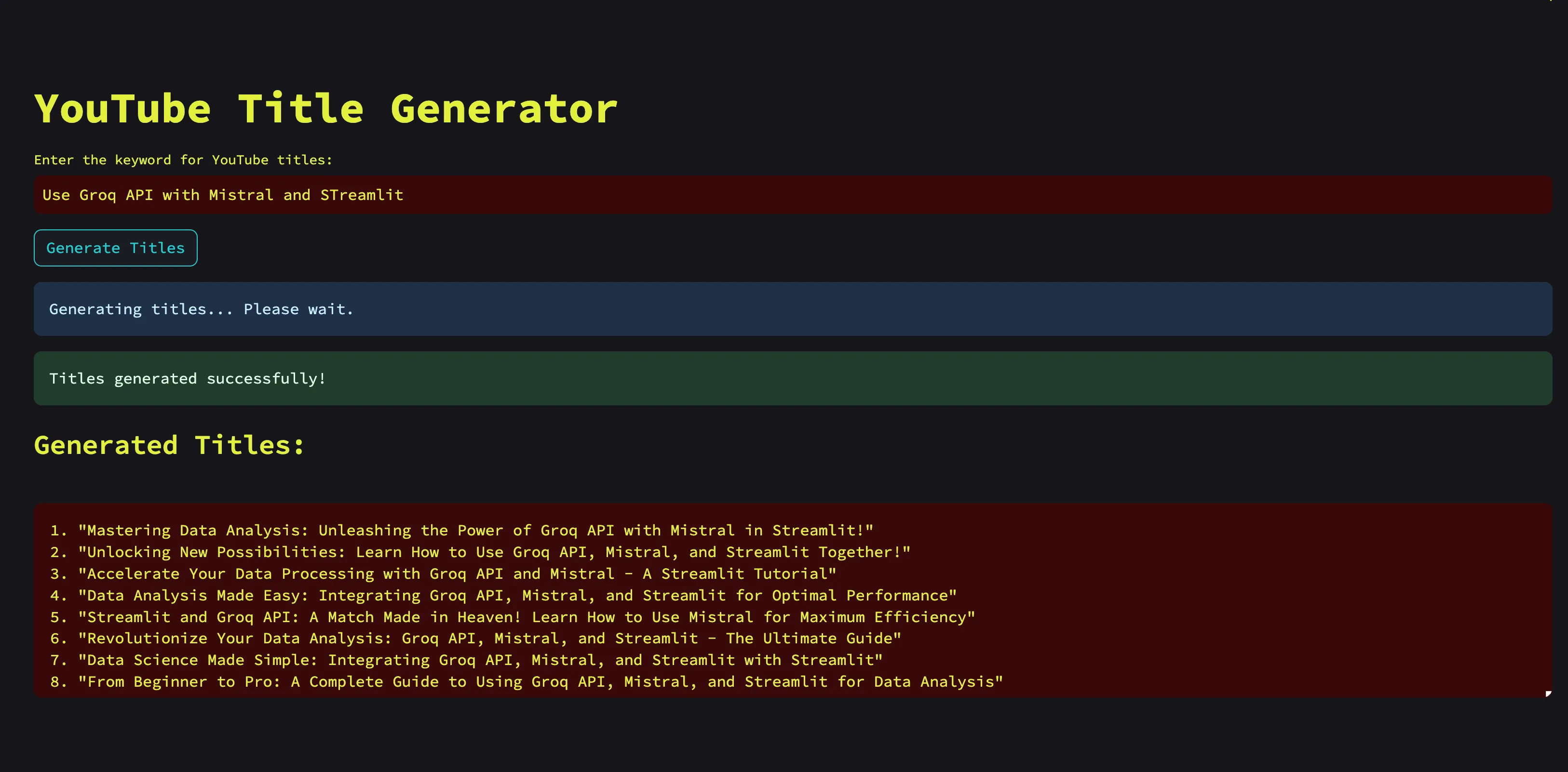
The app opens at http://localhost:8501. Enter a keyword, click Generate Titles, and you’ll see results appear in the text area.
A few things worth noting about the code above:
st.spinnerinstead ofst.info: shows a loading animation, which is better UX than a static message.- Error handling in the UI:
st.error()shows errors inline rather than crashing the app. load_dotenv(): loads the.envfile automatically. For Streamlit Cloud deployment, usest.secretsinstead (covered in the deployment section).
Choosing the right Groq model for your app
The default llama-3.1-8b-instant works well for most prototyping. But Groq offers several models, and the right choice depends on your use case.
Llama 3.1 8B Instant
Best for: High-volume prototyping, fast iteration, simple generation tasks.
This is the speed demon. ~560 tokens per second on the free tier, 14,400 requests per day. Use this as your default unless you have a reason not to.
model="llama-3.1-8b-instant",Llama 3.3 70B Versatile
Best for: Higher quality output, complex instructions, nuanced text.
The bigger model produces noticeably better output for tasks that require reasoning or nuance. The tradeoff: slower (~280 TPS), lower daily request limit (1,000 RPD), and you’ll hit rate limits faster.
model="llama-3.3-70b-versatile",GPT-OSS 20B
Best for: Reasoning tasks, coding assistance, tool use.
OpenAI’s open-weight model running on Groq hardware. Good at structured output and following complex instructions. ~1,000 TPS with 1,000 RPD on the free tier.
model="openai/gpt-oss-20b",Groq automatically caches repeated system prompts with a 50% token savings on cached portions. No setup required. It just works when your app sends the same system prompt across requests. This matters more when you graduate to the paid tier.
Handling rate limits and errors on the free tier
The original article had zero error handling. On the free tier, you will hit rate limits eventually, especially if you’re testing rapidly or building something people actually use. Here’s what you need to know.
Free-tier limits per model
| Model | RPM | RPD | TPM | TPD |
|---|---|---|---|---|
llama-3.1-8b-instant |
30 | 14,400 | 6,000 | 500,000 |
llama-3.3-70b-versatile |
30 | 1,000 | 12,000 | 100,000 |
openai/gpt-oss-20b |
30 | 1,000 | 8,000 | 200,000 |
RPM = requests per minute, RPD = requests per day, TPM = tokens per minute, TPD = tokens per day.
For a personal demo app, these limits are generous. For anything with real users, you’ll outgrow them fast.
Error handling pattern for Streamlit
import groq

def get_groq_completions(user_content):
    client = Groq(api_key=os.environ.get("GROQ_API_KEY"))

    try:
        completion = client.chat.completions.create(
            model="llama-3.1-8b-instant",
            messages=[
                {"role": "system", "content": "You are a YouTube expert..."},
                {"role": "user", "content": user_content}
            ],
            temperature=0.5,
            max_tokens=1024,
            stream=True,
        )

        result = ""
        for chunk in completion:
            content = chunk.choices[0].delta.content
            if content:
                result += content
        return result

    except groq.RateLimitError:
        return "⏳ Rate limit hit. Please wait about a minute and try again."
    except groq.APIConnectionError:
        return "🔌 Network error. Check your internet connection."
    except groq.APIStatusError as e:
        return f"⚠️ API error ({e.status_code}): Please try again later."
The key thing: show the user a message they can act on. A cryptic stack trace in a Streamlit app helps nobody.
The free tier is generous for prototyping and personal use, but has hard limits. If you hit them regularly, Groq’s Developer Tier is pay-as-you-go with roughly 10x higher limits. No commitment required.
What the rate limit headers tell you
Groq’s API response includes headers you can inspect programmatically:
x-ratelimit-remaining-requests: Requests left in the current windowx-ratelimit-remaining-tokens: Tokens left in the current windowx-ratelimit-reset-tokens: Time until the token limit resets
For a simple Streamlit app, you don’t need to parse these. But if you’re building something more complex (queue-based processing, multi-user apps), monitoring these headers lets you implement proactive backoff instead of waiting for a 429 error.
Deploying your Streamlit app
Once your app works locally, you’ll want to deploy it. Two main paths:
Streamlit Community Cloud (Free)
Streamlit Community Cloud hosts public apps for free. It’s the fastest path to a public URL.
Steps:
-
Push your code to a GitHub repository. Include:
app.pyrequirements.txt(see below).envis NOT committed. Add your API key via Streamlit secrets instead
-
Go to share.streamlit.io and sign in with GitHub.
-
Click “New app” → select your repo, branch, and
app.pyfile. -
Before deploying, click “Advanced settings” → paste your secrets in TOML format:
GROQ_API_KEY = "gsk_your_api_key_here"- In your code, replace
os.environ.get("GROQ_API_KEY")withst.secrets["GROQ_API_KEY"]for the Streamlit Cloud deployment (or keep both —st.secretsfalls back to env vars).
requirements.txt:
groq
python-dotenv
streamlit
Limitations to know about:
- ~1 GB RAM limit
- Apps sleep after 12 hours of inactivity. First visitor sees a “waking up” screen
- Only 1 private app (unlimited public apps)
- No custom domains — you’re stuck on
yourapp.streamlit.app - GitHub required for deploy
For a quick demo or portfolio piece, these limits are fine. For anything with regular traffic, deploy on a VPS instead.
VPS with Docker
Running on a VPS gives you full control: no sleep, no RAM limits, custom domain, and you can run multiple apps on the same server.
Create a Dockerfile:
FROM python:3.12-slim

WORKDIR /app
COPY requirements.txt .
RUN pip install --no-cache-dir -r requirements.txt
COPY . .

EXPOSE 8501
CMD ["streamlit", "run", "app.py", "--server.port=8501", "--server.address=0.0.0.0"]docker-compose.yml:
services:
  app:
    build: .
    ports:
      - "8501:8501"
    environment:
      - GROQ_API_KEY=${GROQ_API_KEY}
    restart: unless-stopped
Deploy:
# Set your API key
export GROQ_API_KEY=gsk_your_api_key_here

# Build and run
docker compose up -d
For TLS and a custom domain, put this behind a reverse proxy. I’ve covered how to deploy your Streamlit app on a VPS behind Cloudflare Tunnels in detail. For general Docker patterns, see how to run Python apps in Docker.
For VPS hosting, I use Hetzner Cloud — a CX22 (2 vCPU, 4 GB RAM) is more than enough for a Streamlit app and costs around €4/month. Hostinger VPS is another solid budget option with NVMe storage.
VPS prices jumped across the board in 2026 — if you’re rethinking a rented box, see what changed and when a mini PC wins.
Community Cloud is fine for demos and portfolio pieces. For anything with real users, the 1 GB RAM limit and 12-hour sleep timer will cause problems. A cheap VPS is worth the few euros per month.
Mistral alternative: using Mistral’s own API
Mistral models are no longer available on Groq. If you specifically need Mistral, their own API (La Plateforme) has a free “Experiment” tier.
If you arrived at this article looking for Mistral specifically, Mistral AI runs their own API at console.mistral.ai. The free “Experiment” tier gives you access to their current models including Mistral Small and Mistral Nemo.
Quick example using the mistralai Python SDK:
pip install mistralai python-dotenvimport os
from dotenv import load_dotenv
from mistralai import Mistral
load_dotenv()
client = Mistral(api_key=os.environ.get("MISTRAL_API_KEY"))
completion = client.chat.complete(
model="mistral-small-latest",
messages=[
{"role": "system", "content": "You are a YouTube expert who writes engaging titles."},
{"role": "user", "content": "Install WordPress on Docker"}
],
temperature=0.5,
max_tokens=1024,
)
print(completion.choices[0].message.content)The pattern is similar to Groq. The main difference: Mistral’s API runs on their own infrastructure, so you won’t get Groq’s LPU speed advantage. But the models themselves are competitive, especially for European data residency requirements.
Conclusion and next steps
Groq’s free API plus Streamlit gives you a working AI app in minutes with no credit card and no infrastructure to manage. The integration is straightforward: install the SDK, send chat completions, display results.
Compared to the 2024 version of this article:
- The model changed from Mixtral to Llama 3.1 8B Instant (Mixtral was deprecated)
- Error handling is now included (the original had none)
- Rate limits are documented (the original didn’t mention them)
- Deployment options cover both free Community Cloud and Docker on a VPS
Where to go from here:
- Try different models — swap
llama-3.1-8b-instantforllama-3.3-70b-versatileand compare output quality - Add chat history — use
st.session_stateto maintain conversation context across interactions - Structured outputs — use Groq’s
response_formatwith JSON schema to get clean data instead of parsing text (useful for the YouTube title generator — imagine getting back a JSON array of titles) - Build something more complex — try building an AI research squad with Streamlit or build a full AI agent
- Run models locally — if privacy matters, you can run LLMs locally with Ollama and skip the cloud API entirely
Frequently Asked Questions
Is Groq API really free? Yes. The free tier requires no credit card and gives you access to multiple models including Llama 3.1 8B, Llama 3.3 70B, and GPT-OSS 20B. Each model has its own rate limits (requests per minute, tokens per day), but for personal and prototyping use, they’re generous.
Why did Mistral models disappear from Groq?
Groq’s model partnerships evolved. Mixtral was deprecated in March 2025, and the last Mistral model (mistral-saba-24b) was removed in July 2025. Llama and GPT-OSS models replaced them on the platform. If you need Mistral specifically, use their own API at console.mistral.ai.
Can I use Groq for production apps? The free tier works for prototyping and small internal tools. For production traffic with real users, you’ll hit rate limits quickly. Groq’s Developer Tier is pay-as-you-go with significantly higher limits and access to the Batch API at 50% off standard pricing.
How does Groq compare to OpenAI API for speed? Groq’s LPU hardware consistently delivers faster inference speeds than most cloud APIs. Llama 3.1 8B on Groq runs at ~560 tokens per second. Exact comparisons depend on model size and provider, but for open-source models, Groq is among the fastest options available.